Developer MCP
Connect your IDE to Visa Acceptance Dev MCP. Get grounded answers, and code without leaving your editor.
| Get sandbox access → | View on GitHub ↗ |
Five tools, one connection
Install once. Your IDE gets accurate SDK docs, API schemas, and production-ready code templates — grounded in the current SDK.
| Tool | What it does | Returns |
|---|---|---|
 Browse APIs Browse APIs |
List every available endpoint with HTTP methods, SDK version details, and MLE encryption support per endpoint. |
API index |
 Get API details Get API details |
Pull complete docs for any API class — method signatures, parameters, return types, and usage examples across SDK versions. |
Method + params |
 Look up models Look up models |
Retrieve request and response model schemas — property names, data types, and required versus optional fields for any model class. |
Schema + types |
| SDK setup guide |
Get the complete SDK configuration guide for any language — installation, authentication setup, MLE encryption configuration, and best practices. |
Setup guide |
| Generate code |
Get production-ready code templates for any endpoint in Java, Python, Node.js, PHP, and Ruby — with authentication wired in and ready to run. |
Runnable code |
Built for how developers actually work
Real questions get real answers from the API specs.
"How do I integrate Unified Checkout for my retail merchants?"
Gets a step-by-step integration guide with code samples in your preferred language, sourced from the Unified Checkout implementation guide.
"What APIs do I need for recurring billing?"
Returns a grounded answer from the wiki listing the specific API endpoints, required parameters, and token flow — with source page citations.
"I'm getting PROCESSOR_DECLINED reason code 05 — what does that mean?"
Gets the specific meaning of reason code 05, the recommended remediation steps for that decline type, and retry logic guidance from the error handling docs.
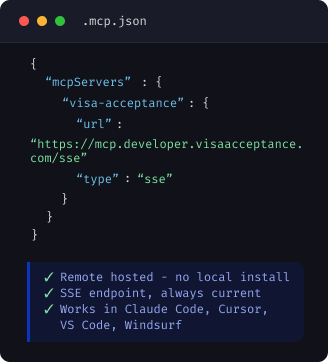
Get started in 3 steps
No install. No CLI. Just add your credentials and a single config block.
WHY IT MATTERS
Grounded answers, not hallucinations
The Developer MCP reads directly from the Visa Acceptance knowledge base — not from model training data. Every answer cites the source page. No guessing, because the agent is reading the docs.
Source-cited answersEvery response links to the specific wiki page it was drawn from, so you can verify and read further. |
 Always currentThe knowledge base syncs nightly. API changes, new fields, and deprecations are reflected without a model retrain. |
 Works in any MCP-compatible IDEClaude Code, Cursor, VS Code with Copilot, Windsurf — one config block, any editor. |
WITHOUT MCP
"To process a payment with Visa, you'll typically need to use their payment API. The exact endpoint varies, but something like /v1/payments should work..."
Model generates a plausible sounding but potentially incorrect answer from training data.
WITH DEVELOPER MCP
"Based on the Payments API guide, the endpoint is POST /pts/v2/payments. The required fields are clientReferenceInformation, orderInformation.amountDetails, and paymentInformation.card..."
Answer sourced from: Payments API Reference — page last updated June 2026.
Ready to connect your IDE?
Get sandbox credentials, add one line of config, and start building with grounded Visa Acceptance docs in your editor.